02
Last Week Recap
Part 1 covered the foundation: parallel sessions, skills as reusable workflows, multi-profile setup, and the compound-engineering plugin. This week we go deeper — tooling, orchestration frameworks, and new Claude Code features that push us closer to fully autonomous workflows.
Parallel Claude Code instances across terminal tabs — different projects, models, and roles running simultaneously.
Reusable SKILL.md workflows, slash commands, and the compound-engineering plugin with 29 specialized agents.
03
Claude Hub — Spyder Spann
Spyder Spann shared Claude Hub, a tool he's building that provides a centralized overview of your entire Claude Code environment. It surfaces project configurations, skills, plugins, and session state in a single dashboard.
See all your Claude Code projects at a glance — which skills and plugins are loaded per project, configuration files, and environment state. Easily view or modify configs without digging through dotfiles.
Builds on the multi-session concept — tabs color-change based on execution stats. At a glance, see which sessions are active, idle, or waiting for input. Visual feedback for parallel workflows.
Browse and edit CLAUDE.md, settings.json, .mcp.json, and skill files directly from the Hub. Add skills or plugins to any environment without switching contexts.
Pull tasks from Azure DevOps directly into the Hub, work on them in Claude Code, and push status updates back. Bridges project management with agentic development.
04
Gas Town — Levels of Agentic Dev
Steve Yegge's "Welcome to Gas Town" framework defines the levels of software development in the age of AI agents — from manual coding to full agent orchestration. A roadmap for where we are and where we're going.
5
Agent Orchestration
Fully autonomous agent swarms — agents managing agents, self-healing systems, continuous deployment
FRONTIER
4
Agentic Coding
AI agents write and ship code autonomously — multi-step workflows, tool use, git operations
WE ARE HERE
3
AI-Assisted Coding
Copilot-style autocomplete, inline suggestions, chat-based code generation
2
IDE Power User
Refactoring tools, snippets, linting, type checking — human-driven tooling
1
Manual Coding
Text editor, terminal, pure human effort
Key insight: Most teams are at Level 3 (AI-assisted). Claude Code with skills, sub-agents, and multi-session puts us firmly at Level 4 (agentic coding). The jump to Level 5 (orchestration) requires agents that can manage other agents autonomously — which is exactly what tools like Hive and Claude Hub are pushing toward.
Resources
| Link | Description |
|---|
| Gas Town Article |
Steve Yegge's original blog post on the levels of agentic development |
| SE Daily Podcast |
Interview with Steve Yegge — Gas Town, beads, and the rise of agentic development |
The Transition
From Agentic Coding to Orchestration
Level 4 (where we are) means a single agent that can write, test, and ship code autonomously. Level 5 means agents managing agents — an orchestration layer that decomposes work, delegates to specialized agents, monitors progress, and handles failures.
Human defines the task. Agent executes it end-to-end with tools, sub-agents, and skills. Human reviews output.
Example: /lfg "add dark mode to settings page" — Claude brainstorms, plans, codes, reviews, ships.
Human defines the goal. Orchestrator decomposes into tasks, assigns to agent pool, monitors execution, handles retries and conflicts.
Example: "Ship v2.0 of the app" — orchestrator manages dozens of parallel agents across features, testing, deployment.
Yegge's argument: The tooling for Level 5 is emerging now — background agents, scheduled tasks, Kanban-style orchestration. The gap isn't capability, it's coordination. The agent can do the work; we need the systems to tell it which work.
05
Hive — Lightweight Agent Orchestration
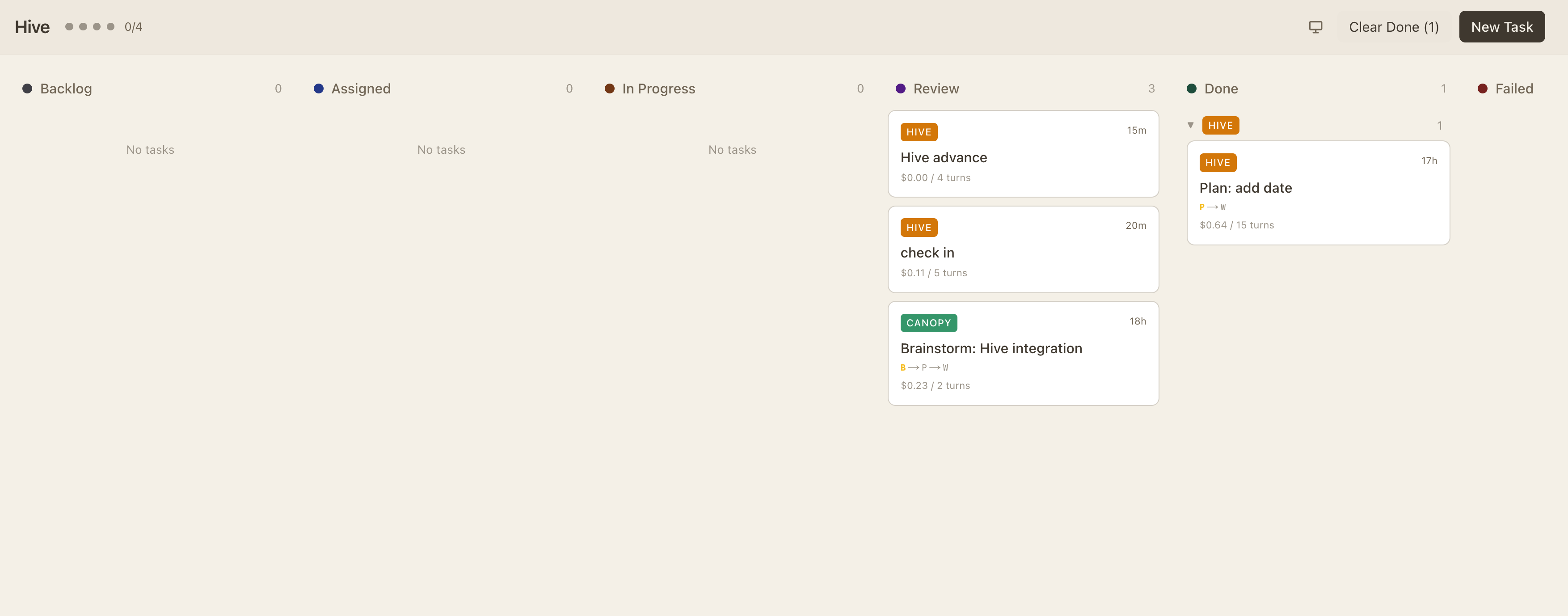
A Kanban-based orchestration system I started building this week. Hive treats agent tasks as cards that flow through stages — Backlog, Assigned, In Progress, Review, Done, Failed. Lightweight coordination for multi-agent workflows.
Visual task tracking with columns: Backlog → Assigned → In Progress → Review → Done / Failed. Each card shows project tag, cost, turn count, and elapsed time.
Each task card tracks its workflow path: S → P → W (Spec → Plan → Work). See exactly where each task is in the development lifecycle.
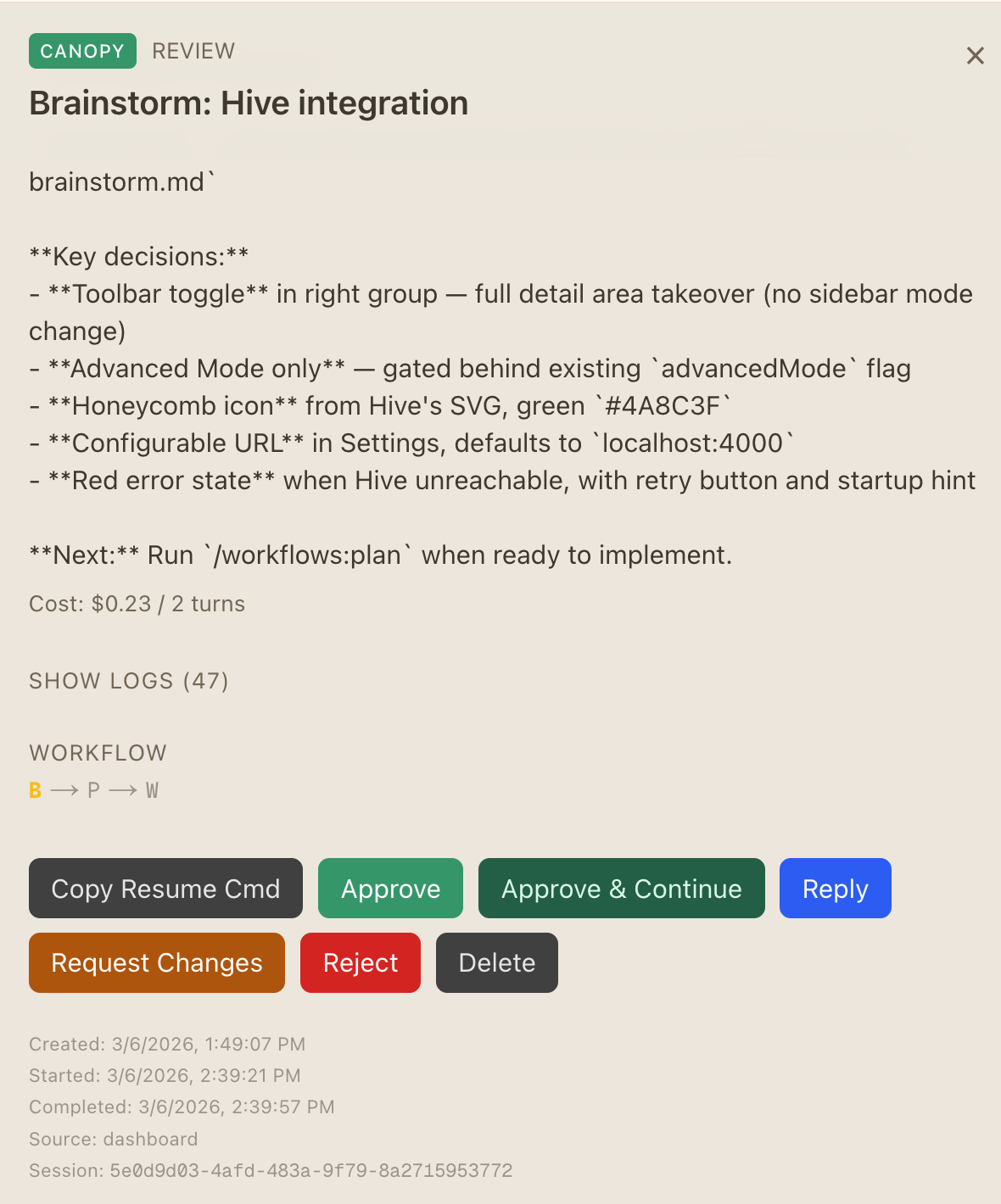
Task Detail View
Each task card expands to show full context: brainstorm output, key decisions, workflow state, cost tracking, and action buttons (Approve, Reject, Resume).
Multi-Project Support
Tags like HIVE and CANOPY identify which project each task belongs to. Filter and prioritize across your entire portfolio.
Why Kanban for agents? Agents need the same workflow discipline as human teams. Without it, you get unbounded parallelism, lost context, and duplicated work. Hive provides lightweight guardrails — just enough structure to keep autonomous agents productive without micromanaging them.
Task Lifecycle
Kanban for Agents
Every task in Hive follows a defined lifecycle. Cards move through columns as agents work on them, providing visibility into what's happening across all sessions.
Backlog
Queued
→
Assigned
Agent claimed
→
In Progress
Working
→
Review
Human check
→
Done
Shipped
Task Card Data
| Field | Purpose |
|---|
| Project tag | Which project this task belongs to (HIVE, CANOPY, etc.) |
| Elapsed time | How long the agent has been working on this task |
| Cost | API cost consumed by the agent session |
| Turns | Number of agent conversation turns |
| Workflow path | S → P → W tracking (Spec, Plan, Work phases) |
| Session ID | Links back to the Claude Code session for resume |
Connecting to Gas Town: Hive is a stepping stone toward Level 5. Today it's a visibility layer — you can see what agents are doing. Next: the orchestrator assigns tasks from the backlog, monitors progress, and automatically escalates failures. The Kanban model naturally supports this evolution.
06
Claude Code — New Autonomous Features
Anthropic shipped two significant features this week that push Claude Code toward always-on autonomous operation: the /loop background worker and scheduled tasks in Cowork/Desktop.
The /loop command turns Claude Code into a background worker. Set a cron-style schedule (minutes, hours, days) and Claude runs recurring jobs locally while the app is open.
Use cases:
| Pattern | Example |
|---|
| Periodic checks | /loop 5m /babysit-prs — check PR status every 5 minutes |
| Data sync | /loop 1h /import_all — run data imports hourly |
| Monitoring | /loop 10m "check deploy status" — poll deployment health |
Cron-like scheduled tasks in Cowork and Claude Desktop. Set up recurring and on-demand tasks that run automatically — daily, weekly, or monthly — without keeping a terminal open.
What's different from /loop:
| Feature | /loop | Cowork Scheduled Tasks |
|---|
| Runtime | Local, requires app open | Cloud-hosted, runs independently |
| Interface | CLI command | Desktop/Cowork UI |
| Scheduling | Interval-based (every Nm) | Calendar-based (daily/weekly/monthly) |
| Best for | Quick polling, dev-time tasks | Recurring business workflows |
Why this matters: These features close the gap between Level 4 and Level 5. With /loop, Claude Code becomes a daemon. With scheduled tasks, it becomes infrastructure. Combined with Hive-style orchestration, you get agents that work while you sleep.
/loop Deep Dive
Claude Code as a Background Worker
The /loop command accepts a time interval and a prompt or slash command. Claude executes it on schedule, accumulating results in the session. Think of it as cron for your AI agent.
Example Patterns
# Check PR status every 5 minutes
/loop 5m /babysit-prs

# Run data imports every hour
/loop 1h /import_all

# Check deploy every 10 minutes (default interval)
/loop "check if staging deploy succeeded"

# Daily code quality scan
/loop 24h "run linting and report issues"
Combining /loop with Hive: Imagine /loop 5m "check Hive backlog, pick next task, execute it" — the agent becomes a worker that pulls from the Kanban queue automatically. This is the orchestration pattern that bridges Level 4 and Level 5.
Scheduled Tasks
Cowork & Desktop Scheduling
Unlike /loop which requires the CLI to stay open, Cowork scheduled tasks run independently in the cloud. Set up recurring workflows that execute on a calendar schedule.
Daily
Morning standup summary, overnight PR review, data freshness checks, security scan results digest.
Weekly
Dependency updates, performance regression reports, documentation sync, changelog generation.
Monthly
License audits, architecture drift analysis, cost optimization reviews, tech debt triage.
On-Demand
Triggered by events — new PR opened, deployment completed, incident detected. Reactive automation.
07
Putting It All Together
The tools and concepts from both weeks converge into a unified autonomous workflow. Here's how the pieces connect.
Claude Hub
Visibility
→
Hive
Orchestration
→
/loop
Execution
→
Skills
Capability
→
Level 5
Autonomous
See all your environments, sessions, configs. Pull tasks from Azure DevOps or other PM tools. The dashboard for your agent fleet.
Kanban orchestration layer. Tasks flow through stages with cost tracking and workflow visibility. The coordination system.
Background workers and cron-style scheduling. Agents run continuously, pulling work from the backlog. The execution engine.
Reusable workflows, specialized agents, compound-engineering plugin. The capabilities that make each agent effective.
The vision: A task enters the backlog (via Claude Hub, Azure DevOps, or manual entry). Hive assigns it to an available agent. The agent runs the appropriate skill pipeline (brainstorm → plan → work → review). /loop keeps the queue moving. Scheduled tasks handle recurring maintenance. Humans review and approve. The system compounds its own knowledge.