Overview on skills, automation, MCP servers, OpenClaw, and the Cincinnati AI community
Irv Cassio • February 2026
02
The 100 Bots Dream
As a person doing solo support for digital, drowning in repetitive tasks. The idea: what if I could create 100 bots to handle all my tasks — and free myself to focus on growth?
The dream was simple: Stop being caught in the operational details. Stop fighting fires. Build something that scales beyond one person's bandwidth — so I could finally focus on strategy, innovation, and the bigger picture.
You don't need 100 bots. You need one agent with the right skills.
Claude Code is an example of this 100 Bots dream coming to life. Skills handle the automation. Multi-session gives you parallelism. Sub-agents give you a team. And it all runs from your terminal.
03
Theme: Autonomous
Claude Code operates as a fully autonomous coding agent — reading files, running commands, managing git, and making decisions. Your CLAUDE.md file defines the rules of engagement.
📄
CLAUDE.md
Project context, conventions, and behavioral rules. Claude reads this at the start of every session. Hierarchy: global → project → subdirectory.
⚙
Plan vs. Act Mode
Shift+Tab toggles Plan Mode — Claude thinks before acting. Act Mode is full autonomy: read, write, execute.
⚡
Hooks
Event-driven automation: PreToolUse, PostToolUse, Notification, Stop. Rules that fire automatically — lint after edits, notify on push.
🔒
Permissions
Fine-grained allow/deny rules per tool. Our setup: full autonomy for file ops, git, builds. Only confirm before force-pushing main or deleting repos.
Deep Dive
⌨
What is Claude Code + CLAUDE.md
Terminal-native agent details, capabilities, and the CLAUDE.md hierarchy
▼
What is Claude Code?
Terminal-Native AI Coding Agent
Claude Code is Anthropic's terminal-based AI coding agent. It reads your files, runs commands, edits code, manages git, and orchestrates multi-step workflows — all from your terminal. Think of it as a senior developer with full repo access that you pair-program with.
⌨
Terminal-Native
Runs in your terminal — no browser, no IDE plugin required. Works with any editor, any repo.
Spawns parallel agents for research, code review, testing — like a team of specialists.
🔎
Context-Aware
Understands your entire codebase, project structure, and conventions via CLAUDE.md files.
CLAUDE.md Deep Dive
CLAUDE.md — The Foundation
CLAUDE.md is the single most important file in your Claude Code setup. It's project instructions that Claude reads at the start of every session — your coding standards, project context, and behavioral rules.
Hierarchy
Location
Scope
Use For
~/CLAUDE.md
Global (all projects)
Personal preferences, behavioral rules, autonomy settings
Module-specific instructions (e.g., API conventions, test patterns)
Demo tip: Our ~/CLAUDE.md sets Claude to "Fully Autonomous Agent" mode — no confirmation needed for file ops, git, builds, or package managers. Only confirms before force-pushing to main or deleting repos.
04
Theme: Multi-Session
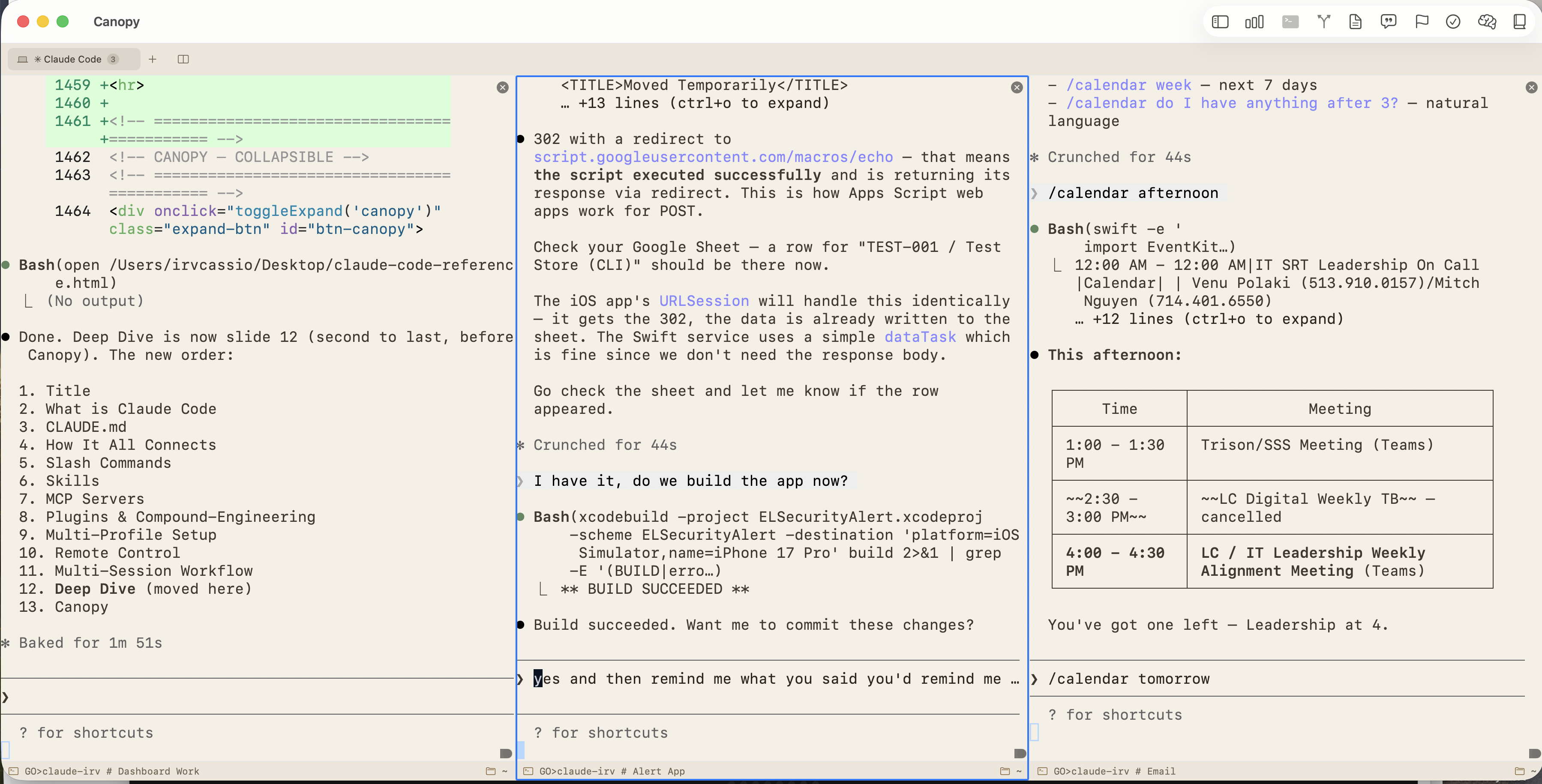
Run multiple Claude Code instances simultaneously in separate terminal tabs. Different projects, different models, different roles — true parallelism on one machine.
Profiles, aliases, symlinks, shared vs. separate config, screenshots
▼
Multi-Session Workflow
Parallel Claude Code Sessions
Run multiple Claude Code sessions simultaneously using Warp (or custom-developed Canopy app) — Mac-native terminals with multi-tab support. Each tab runs an independent Claude Code instance with different profiles, models, or project contexts.
Why Multiple Sessions?
Pattern
Example
Different projects
Tab 1: cd ~/Canopy && claude-irv Tab 2: cd ~/Stoke && claude-irv Tab 3: cd ~/ELSecurityAlert && claude-el
Tab 1: Writing code (act mode) Tab 2: Email triage via MCP (research) Tab 3: Data imports (/import_all)
Parallel work
Session A builds a feature while Session B runs imports — true multitasking with independent contexts
Multi-Profile Setup
Separate Identities, Shared Tools
Run separate Claude Code identities for different contexts — personal projects, work projects, different models — all from the same machine. Shared skills and plugins, isolated session state.
~/.claude
Default profile
Source of truth
~/.claude-irv
Personal profile
Symlinks → .claude
~/.claude-el
Work profile
Symlinks → .claude
How It Works
Shell aliases in ~/.zshrc set CLAUDE_CONFIG_DIR per profile:
# ~/.zshrc aliases
alias claude="claude"                          # default
alias claude-irv="CLAUDE_CONFIG_DIR=~/.claude-irv claude"   # personal
alias claude-el="CLAUDE_CONFIG_DIR=~/.claude-el claude"     # work

# Model variants (same config dir, different model)
alias claude-irv-sonnet="CLAUDE_CONFIG_DIR=~/.claude-irv claude --model sonnet"
alias claude-el-opus="CLAUDE_CONFIG_DIR=~/.claude-el claude --model opus"
alias claude-irv-haiku="CLAUDE_CONFIG_DIR=~/.claude-irv claude --model haiku"
Claude Code spawns specialized sub-agents that work in parallel — like delegating to a team. The /workflows pipeline takes a feature from idea to shipped code, launching multiple agents at each stage.
Brainstorm Explore & clarify
→
Plan Design approach
→
Work Ship the feature
→
Review Multi-agent audit
→
Compound Document learnings
🚀
/lfg
"Let's go" — full autonomous mode. Plan, implement, review, ship. One command kicks off the entire pipeline with parallel agents.
🛠
/workflows:review
Spawns 6+ specialized agents in parallel: security-sentinel, performance-oracle, architecture-strategist, code-simplicity-reviewer, and more.
How it works: Each /workflows stage spawns sub-agents — Explore, Plan, General Purpose, Background — that run concurrently. The compound-engineering plugin adds 29 specialized review/research/design agents on top. One command, an army of agents.
Deep Dive
🤖
Workflows & Sub-Agents Detail
The brainstorm-plan-work-review-compound pipeline, sub-agent types, compound-engineering stats
▼
Engineering Lifecycle
The /workflows Pipeline
The /workflows pipeline — from idea to institutional knowledge. Each stage is a separate command that can be used independently or chained together.
Stage
Command
What Happens
Ideation
/workflows:brainstorm
Explore requirements and approaches through collaborative dialogue before planning
Planning
/workflows:plan
Transform feature descriptions into well-structured markdown plans
Execution
/workflows:work
Execute a work plan efficiently — ship complete features systematically
Review
/workflows:review
Exhaustive multi-agent code review with ultra-thinking and worktrees
Documentation
/workflows:compound
Document solved problems while context is fresh
The pipeline:/workflows:brainstorm → /workflows:plan → /workflows:work → /workflows:review → /workflows:compound
Each stage feeds into the next. Brainstorm outputs inform the plan. The plan feeds the work command. Review validates the work. Compound captures the learnings.
Sub-Agents
Sub-Agents & Task Tool
Claude Code can spawn specialized sub-agents that run in parallel — like delegating to a team. Each agent has its own context and toolset. They return results to the main session.
Explore Agent
Fast codebase search — find files, grep code, answer questions about structure. Used for research without polluting main context.
Full agent with all tools. Used for complex multi-step tasks that need autonomy.
Background Agents
Run tasks in background while you continue working. Get notified on completion.
Parallel execution: Multiple agents can run simultaneously — e.g., one researching docs while another runs tests while a third reviews code. Massive time savings on complex tasks.
compound-engineering
The Compound-Engineering Plugin
"AI-powered development tools that get smarter with every use." — From the Every Inc marketplace.
29
Agents
22
Commands
21
Skills
1
MCP Server
Review Agents 15 AGENTS
Specialized code review from every angle. /workflows:review runs these in parallel against your PR or branch.
Headless browser automation embedded in Claude Code workflows. Playwright drives authenticated enterprise portals, scrapes data, and automates web interactions — all triggered by slash commands.
Automated Data Imports
Command
What It Automates
/import_storemastersharepoint
SharePoint download with auto-auth MFA recovery PLAYWRIGHT
Google Sheets → MongoDB (4,500+ device records) API
/import_storegps
Unified GPS table from Knox, Meraki, OneLRA API
🌐
Stoke Agent
LinkedIn engagement automation — Playwright + Claude Haiku for AI-generated comments on targeted posts.
🤖
agent-browser Skill
Vercel's agent-browser CLI — browse websites, fill forms, take screenshots, scrape data from Claude Code.
07
Skills Overview
Skills are folders with a SKILL.md descriptor plus optional scripts and resources. Unlike commands (user-only), skills can auto-activate when their description matches the task context.
All 10 custom skills and 22 plugin skills with triggers and descriptions
▼
9
Custom Skills
Built by us
Click to expand
22
Plugin Skills
compound-engineering + others
Click to expand
Custom Skills 10 SKILLS
Hand-built by us, stored in ~/.claude/skills/. These are purpose-made for our daily workflows.
Skill
Trigger
What It Does
/calendar
Auto-Activate
Show today's calendar events using EventKit (works with Exchange/Outlook calendars). Supports filtering by time range.
/brain
User-Invoked
Save useful conversation output (explanations, how-tos, references) as a clean markdown doc in ~/brain/. Auto-detects filename and category (references, notes, domains). Checks for dupes, auto-commits to git.
/mongo
User-Invoked
Fetch sample documents from any MongoDB collection to understand schemas. Supports personal and corporate instances with auto-detection. Read-only — hardcoded safety.
/present
User-Invoked
Generate a single offline-ready HTML presentation file. Each slide is an iframe-isolated HTML5 document with keyboard navigation.
/projects
User-Invoked
Interactive project directory picker — numbered list of all 11 active projects. Pick a number, Claude cds into it and asks what to work on.
/screenshot
Auto-Activate
Load recent screenshots from Google Drive into the conversation. Multimodal — Claude sees and analyzes the image. Great for UI review and debugging.
/storelookup
User-Invoked
Full deep-dive on any EssilorLuxottica retail store — identity, devices, GPS, tickets. Queries MongoDB + OneLRA API.
/symlinks
User-Invoked
Show all symlinks across Claude Code config profiles (.claude, .claude-irv, .claude-el). Useful for verifying multi-profile setup.
/topemail
Auto-Activate
Pull most recent emails from key contacts on Exchange using the Apple Mail MCP server.
/usageleft
User-Invoked
Check Claude usage vs. daily/weekly allotment with visual bar graphs.
Installed Plugin Skills 22 SKILLS
From compound-engineering and other installed plugins. Auto-activate based on task context.
Skill
Source
What It Does
agent-browser
compound
Browser automation via Vercel's CLI — forms, scraping, screenshots
agent-native-architecture
compound
Build apps where agents are first-class citizens
brainstorming
compound
Explore requirements before planning (feeds into /workflows:brainstorm)
compound-docs
compound
Capture solved problems as searchable documentation with YAML frontmatter
create-agent-skill
compound
Create or edit Claude Code skills with expert guidance
frontend-design
compound
Production-grade UI — avoids generic AI aesthetics
gemini-imagegen
compound
Generate/edit images via Gemini API (Nano Banana Pro)
git-worktree
compound
Isolated parallel development with Git worktrees
last30days
compound
Research any topic across Reddit + X + Web from the last 30 days. Uses OpenAI + xAI APIs for engagement metrics
Upload/sync files to S3, R2, B2, Google Drive, Dropbox
skill-creator
compound
Guide for creating effective skills from scratch
/workflows Pipeline 5 STAGES
/workflows:brainstorm
Ideation
Explore requirements and approaches through collaborative dialogue
/workflows:plan
Planning
Transform feature descriptions into well-structured markdown plans
/workflows:work
Execution
Execute a work plan efficiently — ship complete features systematically
/workflows:review
Review
Exhaustive multi-agent code review with ultra-thinking and worktrees
/workflows:compound
Documentation
Document solved problems while context is fresh
08
Skill: /import_all
One command to refresh all enterprise data sources. Five daily imports orchestrated in the correct dependency order with a combined summary table.
Import Pipeline
StoreMaster SharePoint
→
Vodafone M2M Portal
→
Store GPS Knox + Meraki
→
Meta Raw Google Sheets
→
7-Day Compute history
Pattern: Each import is a standalone Python script wrapped in a slash command. /import_all chains them in sequence with error handling and a formatted summary table. Playwright handles authenticated portals, Google API handles sheets.
09
Skill: /screenshot
Load recent screenshots into the conversation. Claude sees and analyzes images — multimodal context injection from your screenshot folder.
📷
How It Works
Auto-activates when you mention screenshots. Reads the N most recent images from ~/My Drive/Screenshots/ using Claude's multimodal vision. Great for UI review, debugging visual issues, and design feedback.
Example: "Show me my last 3 screenshots" → Claude loads images, analyzes layouts, spots CSS issues, compares against design specs — all in one turn.
10
Skills: /mongo + /storelookup
Enterprise data skills — fetch MongoDB schemas and run full store deep-dives, all from the terminal.
🗃
/mongo
READ-ONLYAUTO-DETECT
Fetch sample documents from any MongoDB collection. Auto-detects personal vs. corporate instance. Injects real schemas into conversation for informed code generation.
🔍
/storelookup
DEEP DIVEMULTI-SOURCE
Full store deep-dive by number — identity, device counts across all systems, GPS sources, and recent tickets. Queries MongoDB + OneLRA API.
Safety first: Both skills are read-only. Pull data, inspect, analyze — never write. Connection strings stored in macOS Keychain.
11
Remote Control
Continue a local Claude Code session from your phone, tablet, or any browser. Start a task at your desk, pick it up from the couch. BUILT-IN FEATURE
Start Methods
Method
Command
Notes
New session
claude remote-control
Shows URL + QR code. Press Space to toggle QR.
Existing session
/remote-control or /rc
Carries over current conversation.
All sessions (auto)
/config → Enable
Every session becomes remotely accessible.
How it works: Claude Code runs locally. Remote Control creates a secure outbound tunnel via the Anthropic API — no inbound ports. Your phone is just a window into the local session. Available on Pro and Max plans (Research Preview).
12
Skill: /calendar
Query your calendar from the terminal using macOS EventKit. Works with Exchange/Outlook calendars — bypasses AppleScript's Exchange limitations via inline Swift compilation.
📅
Natural Language Queries
"What do I have this afternoon?" • "Show me tomorrow's meetings" • "Am I free at 2pm?"
Supports: today, tomorrow, morning, afternoon, week, and natural-language time questions.
Technical trick: Compiles and runs a Swift snippet at call time via swift -e. EventKit correctly reads all calendar accounts including Microsoft 365 — something AppleScript can't do reliably.
13
Skill: /usageleft
Check your Claude usage versus daily and weekly allotment with visual bar graphs. Know exactly how much capacity you have left without leaving the terminal.
📊
Usage Dashboard
5-HOUR ROLLING7-DAY OVERALLPER-MODELEXTRA USAGE
Unicode block characters with color-coded utilization levels. Fetches from the Anthropic OAuth API using stored Keychain tokens. Works across all Claude Code profiles via $CLAUDE_CONFIG_DIR detection.
14
Skill: /present
Generate a self-contained presentation HTML from a natural-language description. Each slide is a standalone HTML5 document. It's how I prototype decks in seconds.
🎬
Key Features
OFFLINE-READYSINGLE FILEKEYBOARD NAVOVERVIEW GRID
Uses iframe.srcdoc (not blob URLs) for file:// compatibility. Supports slide types: title, bullets, code, SVG charts, base64 images. Press Escape for thumbnail grid overview. Writes the .html and opens it immediately.
15
Skills: /topemail + /last30days
Two research skills — one for priority email from key contacts, one for real-time topic research across the web.
✉
/topemail CUSTOM
Priority emails from key contacts via Exchange. Uses AppleScript with dedicated per-contact mailboxes (Exchange whose clause workaround). Urgent emails surfaced from _Urgent mailbox rule.
🔍
/last30days PUBLIC
Publicly installable skill — research any topic across Reddit, X/Twitter, and web search. Uses OpenAI + xAI APIs for engagement-weighted synthesis. Graceful degradation to web-only if API keys absent.
16
MCP Servers
The Model Context Protocol is Anthropic's open standard for connecting AI to external tools and data. MCP servers give Claude direct, structured access to APIs and services.
✉
Apple Mail MCP INSTALLED
Search, read, send, reply, forward emails. Manage folders and attachments. Works with Exchange accounts on macOS. Custom-built Python MCP server.
Search, create, update pages and databases. Manage comments and teams directly from Claude Code.
📖
Context7 MCP PLUGIN
Live documentation lookup for any library. Auto-configured via compound-engineering plugin.
Ecosystem
GitHubSlackPostgreSQLPlaywrightLinearFilesystemJira
— and hundreds more
Deep Dive
🌳
Canopy — Mac-Native SSH + Git + AI Client
Custom-built macOS app: terminal, SFTP sync, Git client, BYOK AI chat — developed entirely with Claude Code
▼
The philosophy: Review and optimize everything. Build your own SSH client to have the exact workflow you want, with AI built in from day one. This is the "rethink everything to 10X ourselves" approach in action — and proof that Claude Code can ship real, production macOS apps.
A custom-built macOS app that combines SSH terminal, SFTP file sync, Git client, and BYOK AI chat in one window. Built with SwiftUI, zero external SDKs for networking or AI — everything is pure URLSession + Citadel SSH. Developed entirely with Claude Code.
By the Numbers
111
Swift Files
15.5K
Lines of Code
5
AI Providers
Swift 6
macOS 15+
⌨
Multi-Tab Terminal
SSH + local terminal tabs with split panes (Cmd+D). xterm-256color via SwiftTerm. Dynamic resize, copy/paste, per-tab session isolation.
🔒
SSH & Auth
Citadel SSH v2 — password auth, Ed25519 keys, RSA keys. macOS Keychain for credentials. Server profiles stored as JSON.
📁
SFTP File Sync
Side-by-side local/remote file comparison. Push & pull with progress tracking. Filter by status (modified, local-only, remote-only). Checksum or size-based diff.
👁
Full Git Client
Branch management (create, checkout, delete, push, pull). Commit history timeline. Unified & side-by-side diff views with syntax highlighting.
🤖
AI Chat — BYOK Multi-Provider
Built-in AI assistant with streaming responses, file attachments (drag-and-drop), @-mention snippets, and per-server conversation history. All via URLSession REST + SSE parsing — no vendor SDKs.
Provider
Default Model
Notes
Claude (Anthropic)
claude-sonnet-4-5
Multimodal, SSE streaming, x-api-key auth
OpenAI
gpt-4o
Multimodal, Bearer token, function calling
OpenRouter
anthropic/claude-sonnet-4-5
200+ models, OpenAI-compatible API
Ollama (local)
llama3.2
Fully offline, configurable base URL
LM Studio (local)
User-selected
OpenAI-compatible, localhost:1234
Productivity Panels
Dashboard
Server metrics — uptime, CPU load, memory, disk, IPs. Works for both SSH and local machine.
Prompt Snippets
Saved prompt templates with categories and tags. @-mention to insert into AI chat.
Goals & Tasks
Lightweight project tracking — goals (active/completed) and tasks (pending/done) with inline add/edit/delete.
Knowledge Vault
Personal docs library with full-text search. "Send to Chat" injects content into AI conversation for context.
@Observable + @MainActor architecture. Actor-based services for thread safety. Window opacity control (30-100%). Theme system (Default + Canvas). Zero vendor AI SDKs — all providers via URLSession REST + SSE. Bundle ID: com.irvcassio.Canopy
17
OpenClaw
The open-source AI agent that lives in your messaging apps. 200,000+ GitHub stars. A phenomenon that went from weekend project to global movement — and a signal of what most people have been wanting out of AI.
The Timeline
ClawdBot Nov 2025
→
MoltBot Jan 27
→
OpenClaw Jan 30
→
OpenAI hires Peter Feb 15
Created by Peter Steinberger (PSPDFKit). Anthropic trademark cease-and-desist triggered three names in three days. Then OpenAI hired Steinberger to lead their personal agents effort — OpenClaw moves to a foundation and stays open-source.
Why this matters: The idea of a fully autonomous AI working for you — managing your todo list, self-learning, having memory and a personality — is transformative. OpenClaw is proof of the demand. Apple has seen a surge in Mac mini sales driven by people buying them specifically to host personal AI agents. This isn't a developer trend — it's mainstream.
Security Considerations
Security researchers have identified risks in third-party skills — including data exfiltration and prompt injection. With great autonomy comes real responsibility. Learn more
Global Unhackathon
On Feb 28, 2026 — 24+ AI Tinkerers cities worldwide. Heads-down build session: no pitches, no panels, just ship code. Cincinnati details
18
Community — Cincinnati AI
The Cincinnati AI scene is thriving. Multiple overlapping communities for builders, tinkerers, and professionals. Here's where to plug in.
Step-by-step: skills, MCP servers, plugins, and multi-profile configuration
▼
Custom Skills
Install Skills
Skills are folders with a SKILL.md file. Copy a skill folder into ~/.claude/skills/ and it's immediately available. Our 9 custom skills are authored in-house — build your own following this pattern, or check the Anthropic Skills Repo for community examples.
Our Custom Skills
Skill
What It Does
Trigger
/screenshot
Load recent screenshots into conversation (multimodal)
Auto
/calendar
macOS EventKit calendar via inline Swift — works with Exchange
Auto
/usageleft
Claude usage vs. allotment with visual bar graphs
User
/present
Generate offline-ready HTML slide deck from description
User
/mongo
Fetch MongoDB sample documents for schema reference (read-only)
User
/storelookup
Full store deep-dive — identity, devices, GPS, tickets (MongoDB + OneLRA)
User
/topemail
Priority emails from key contacts via Exchange
Auto
/projects
Interactive project directory picker
User
/symlinks
Show symlinks across multi-profile config
User
Skill File Structure
# Create a skill
mkdir -p ~/.claude/skills/my-skill

# Add the SKILL.md descriptor
cat > ~/.claude/skills/my-skill/SKILL.md << 'EOF'
---
name: my-skill
description: What this skill does (used for auto-activation matching)
user-invocable: true
argument-hint: "optional argument description"
---
# Instructions for Claude when this skill activates
Your prompt and instructions here...
EOF
MCP Servers
Connect MCP Servers
MCP servers are defined in ~/.claude/.mcp.json. Each server is a local process that Claude Code communicates with via the Model Context Protocol.
✉
Apple Mail MCP
Read, search, send, and manage emails. Works with Exchange/Outlook on macOS.
# 1. Clone and set up
git clone https://github.com/your-repo/apple-mail-mcp ~/apple-mail-mcp
cd ~/apple-mail-mcp
python3 -m venv venv
./venv/bin/pip install -e .

# 2. Add to ~/.claude/.mcp.json
{
  "mcpServers": {
    "apple-mail": {
      "command": "~/apple-mail-mcp/venv/bin/python",
      "args": ["-m", "apple_mail_mcp.server"]
    }
  }
}
📝
Notion MCP
Installed via the Notion plugin marketplace. Search, create, and update Notion pages directly from Claude Code.
# Installed as a plugin marketplace
# In Claude Code settings, install from: notion-plugin-marketplace
# Requires a Notion integration token
📖
Context7 MCP
Auto-configured when you install the compound-engineering plugin. Provides live documentation lookup for any library — no additional setup needed.
Plugins
Install Plugins
Plugins extend Claude Code with curated skills, agents, and workflows. Install from marketplaces in Claude Code settings.
⚙
compound-engineering ESSENTIAL
The engine behind /workflows. Provides 29 agents, 22 commands, 21 skills, and the Context7 MCP server.
# Install from Every marketplace in Claude Code settings
# Marketplace: every-marketplace
# Package: compound-engineering
After install, you get: /workflows:brainstorm, /workflows:plan, /workflows:work, /workflows:review, /workflows:compound, /lfg, /slfg, review agents (security-sentinel, performance-oracle, etc.), and more.
🐦
swift-lsp OPTIONAL
Swift Language Server Protocol integration. Gives Claude Code type awareness, autocomplete, and symbol resolution for Swift/SwiftUI projects. Requires Xcode installed.
# Install from official marketplace in Claude Code settings
# Marketplace: claude-plugins-official
# Package: swift-lsp
Multi-Profile
Multi-Profile Setup (Optional)
Run separate Claude Code identities for personal and work contexts. Shared skills and plugins, isolated session state.
Shell Aliases
# Add to ~/.zshrc
alias claude="claude"
alias claude-irv="CLAUDE_CONFIG_DIR=~/.claude-irv claude"
alias claude-el="CLAUDE_CONFIG_DIR=~/.claude-el claude"

# Model variants (same config dir, different model)
alias claude-irv-sonnet="CLAUDE_CONFIG_DIR=~/.claude-irv claude --model sonnet"
alias claude-el-opus="CLAUDE_CONFIG_DIR=~/.claude-el claude --model opus"
alias claude-irv-haiku="CLAUDE_CONFIG_DIR=~/.claude-irv claude --model haiku"